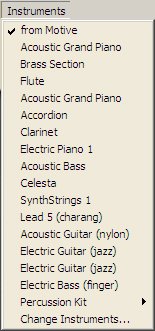
| The Instruments Menu |
Previous Next |
Note: The active sound set may be changed at any time by selecting Change Instruments from the Instruments Menu.
Pitched sounds may be selected directly in the Instruments pop-down menu. Percussion sounds may be selected by first choosing "Percussion Kit" from the Instruments pop-down menu and then selecting the desired instrument from the percussion sub-menu. If an unpitched percussion sound is selected, pitched information in the motive or stroke will be ignored.
Note: Melody windows support a single
instrument sound at any given time. Percussion windows may have a different
instrument sound for each track, to a maximum of ten sounds (or tracks)
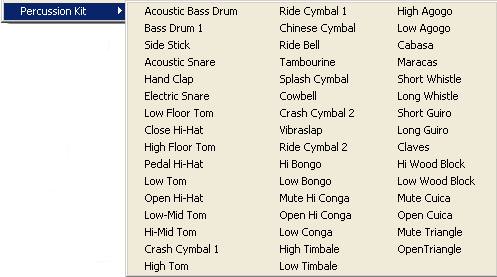
To select an instrument sound for a stroke or group of strokes in the Sketch Window, select the stroke or strokes using the Arrow Tool and choose the desired sound from the Instruments Menu.
The From Motive item in the Instruments Menu refers to instrument selection for strokes in the Sketch Window. When first drawn, strokes will sound the instrument associated with the Melody Window of the same colour. This may be changed by selecting the desired stroke with the Arrow tool and choosing a new instrument sound from the Instruments Menu.