|
The Help Menu |
Previous Next |
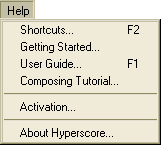
The Help Menu contains four items:
A list of Keyboard Short Cuts may be accessed by choosing Help->Short Cuts from the Help Menu or by pressing function key F2.
Getting Started
with Hyperscore gives the beginning user enough information to begin
to compose in the Hyperscore environment.
The Hyperscore User Guide
(this document) describes in detail each window, button and menu item
with their associated function.
The Composition Tutorial provides more advanced composition suggestions and examples.