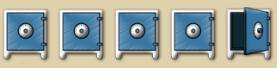
Hyperscore has five safes
positioned in the toolbar at the bottom of the screen. Each safe may
contain a different Hyperscore piece, meaning that you can have five
Hyperscore files open simultaneously. On opening a file, it will appear in
whichever safe is open at the time and will replace whatever is in that safe.
The contents of other safes will not be affected.
To move from one safe to another, simply click on the desired
safe.
Material may be copied from one safe to another.
Simply select and copy the required notes or strokes, change safes, select a
Melody, Percussion or Sketch Window as appropriate and paste in the material.
To copy an entire window from one safe to aother, select the window (Melody,
Percussion or Sketch) but not the contents, copy (Ctrl-C), change safes and
paste (Ctrl-V).
On closing Hyperscore, you will be prompted to save the
contents of any safe which has been modified. These pieces will then be present
in their respective safes on restarting the software.